

Header Image
The Header Image is a powerful tool of your theme that enhances the headings of any page. When enabled, it sets up the page heading above all existing content.
The Header Image comprises the following elements:
- heading of Single (Post, Page, Project)
- metadata, which could consist of Categories, Date or Comments number
- breadcrumbs
- background, which — depending on case — could be a color, an image or an image with overlay color
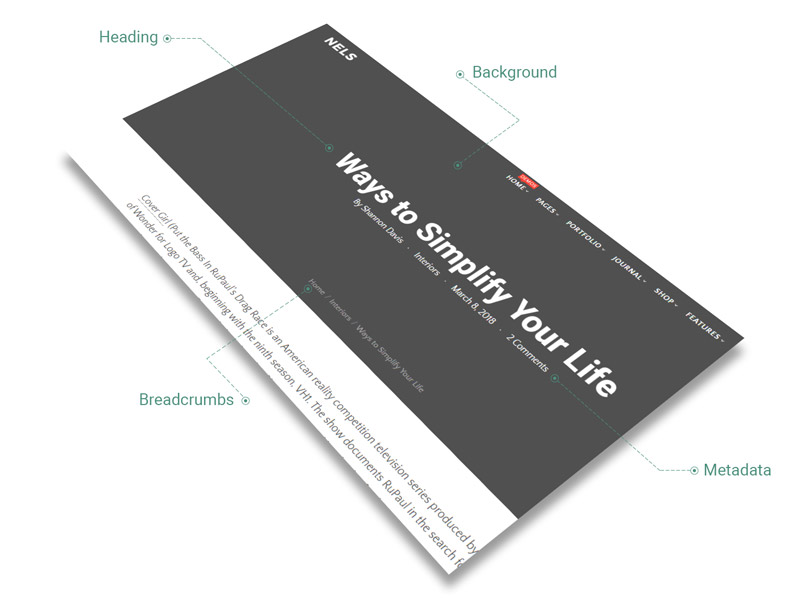
In the case of Singles, the Header Image can be changed locally by enabling/disabling it. It functions in optimal conditions when the title and Header Image are both set up. For more information please see.
The following options are available:
- Enabled — check this if you want to have a Featured Branding on each Post, Page and Project
- Color style — affects both the overlay color and its transparency
- Overlay color — it covers Heder Image (when it is setup), which is used to fill up Header Image
- Overlay transparency — enter a value for overlay color transparency, measured in percents
- Spacing — the amount of space the Header Image fills up from the total height of browser window
- Height — enter the height of Header Image from the total height of browser window, measured in percents
- Parallax — if enabled, parallax scroll effect is applied to Header Image
If the Featured Branding is enabled and Featured Branding image is set up in Theme Options, it appears on any page of your site.
However, it could be replaced locally on Single pages (Post, Project, Page), by choosing another Featured Image.